
0
0




🔥 About the Game
This kakuro puzzle game brings the classic cross-sums challenge to your browser, no download required. Each grid mixes numbered clues with empty white cells, and your job is to fill them in so every run adds up correctly.
If you enjoy sudoku-style logic, kakuro puzzle online play offers a similar kind of satisfaction, built entirely around addition and digit placement rather than pattern-spotting alone.
What Makes This Game Unique
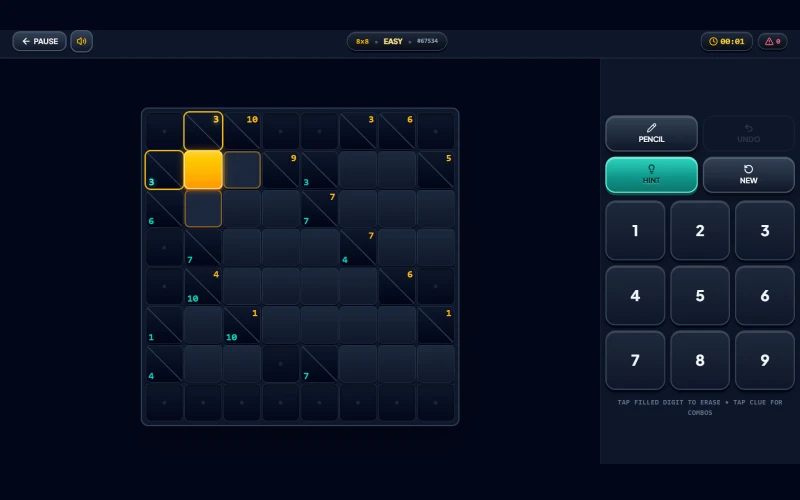
Every clue cell shows the exact sum its row or column of white cells needs to reach. From there, you work backward to figure out which digits, from 1 through 9, make that sum possible without repeating a number in the same run.
The game also shows you valid digit combinations on request. Tap any clue cell during play, and you'll see the possible number sets for that sum, which is a handy way to learn the logic behind the puzzle.
Gameplay Overview
You start by picking a grid size and difficulty. Sizes range from a compact 4×4 up to a sprawling 9×17 layout, and each one comes in five difficulty tiers, from Easy to Expert.
Once you're in, tap a white cell and enter a digit using the on-screen keypad. A mistake counter and timer sit at the top of the screen, so you can track how clean and how fast your solve is going.
Need to think through options before committing? Switch on Notes mode to pencil in candidate digits, then tap the same number again to erase it.
Game Features
- Five grid sizes, from 4×4 up to 9×17
- Five difficulty tiers: Easy, Intermediate, Hard, Challenging, and Expert
- Pencil notes mode for jotting down candidate digits
- A hint button for when you're stuck
- Undo, so you can take back your last entry
- A live mistake counter and running timer
- Tap-to-view valid digit combinations on any clue cell
- Sound effects you can toggle on or off
How to Play Kakuro Puzzle Game
- Choose a grid size and difficulty level to start a new puzzle.
- Look at a clue cell's number. It tells you what the connecting row or column of white cells must add up to.
- Tap a white cell, then enter a digit from 1 to 9 using the keypad.
- Remember that no digit can repeat within the same continuous run, whether it runs across or down.
- Keep filling cells until every run matches its clue, and the puzzle is solved.
Goal
Your goal is to fill the entire grid so that every across and down run sums to its clue, using digits from 1 to 9 with no repeats within a run. The same digit can still appear more than once in a row or column, as long as it sits in a separate run split off by a black cell.
Zero is never used, so every cell holds a digit from 1 through 9.
Replayability
Since the game covers five grid sizes and five difficulty tiers, there's a wide range of puzzles to work through before you've seen them all. A quick 4×4 makes for a short warm-up, while the largest grid gives you a much longer session.
You can also start a new puzzle at any time from the keypad, so there's always another grid ready when you want one.
Controls
Desktop
- Click a white cell, then click a number on the keypad to fill it in.
- Click the pencil icon to toggle Notes mode before entering candidate digits.
- Click Hint or Undo to get help or take back a move.
Mobile & Tablet
- Tap a white cell, then tap a number on the keypad to fill it in.
- Tap the pencil icon to toggle Notes mode.
- Tap Hint or Undo as needed.
FAQs
Not within the same run. A digit can never repeat across or down within one continuous run, but it can reappear in a separate run in the same row or column.
Notes mode lets you jot down candidate digits in a cell without committing to an answer. Tap the same number again to erase it.
Yes. A Hint button is available during play, and tapping any clue cell also shows you the valid digit combinations for that sum.
Yes. A mistake counter sits at the top of the screen alongside a running timer, so you can see how your solve is going.
The game offers five sizes, from a 4×4 grid up to a large 9×17 layout, each available across five difficulty tiers.