0
0


🔥 About the Game
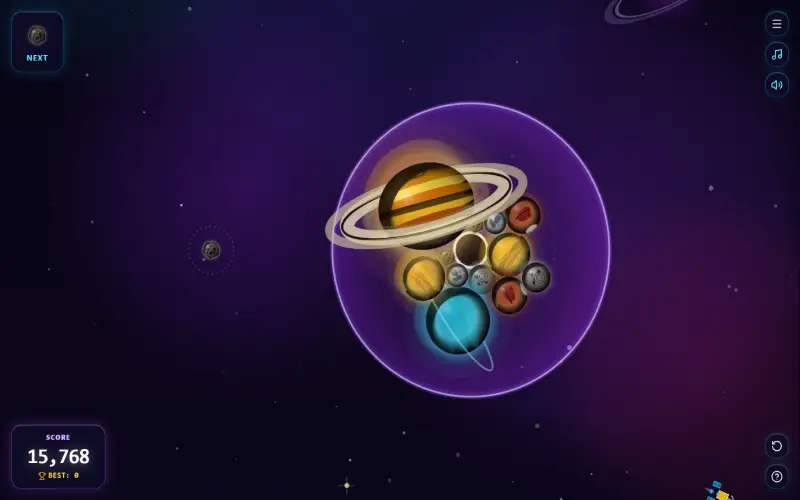
Planet Merge is a casual puzzle game where you build worlds instead of stacking fruit. You launch planets into a spherical gravity well and merge matching ones until a blazing Sun appears.
Looking for a planet merge game online free? This one runs in your browser and costs nothing to play.
The planet merge game blends orbital gravity with the classic drop-and-merge formula. It feels familiar, yet the space setting adds a fresh twist.
What Makes This Game Unique
Most merge games use a flat, rectangular container. Planet Merge swaps it for a round containment sphere with its own gravity field.
Planets don't simply fall and stack. They drift toward the core, orbit in clusters, and settle into natural packing.
Each body also has its own mass, bounce, and friction. As a result, every planet behaves a little differently.
Gameplay Overview
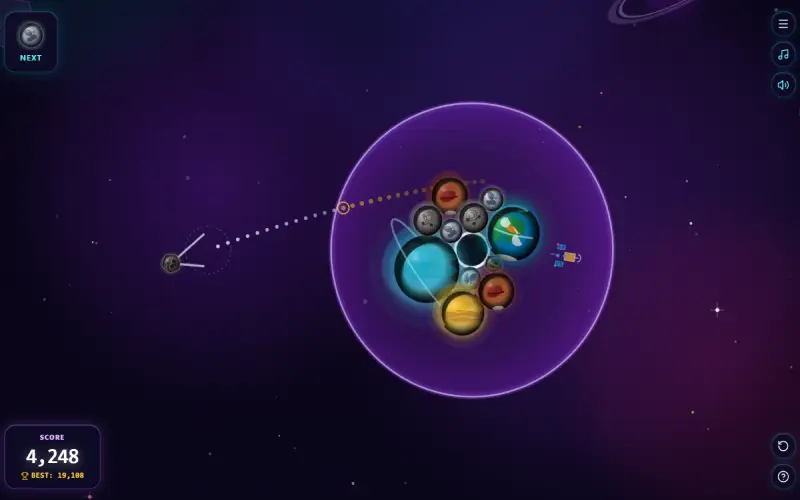
You control an omni-directional cosmic slingshot. Pull it back, aim in any direction across 360 degrees, and release.
A dotted trajectory line shows your launch angle and entry speed. That preview helps you plan each shot before you commit.
Your planet then passes through a semi-permeable membrane and gets pulled toward the center. When two identical bodies collide, they fuse into the next tier.
Every merge sets off score popups, radial shockwaves, starburst particles, and a corona flare. Chain reactions can follow, so one smart shot may clear a lot of space.
Game Features
- 11 celestial tiers: Grow from an Asteroid through the Moon, Mercury, Mars, Venus, Earth, Uranus, Neptune, Saturn, and Jupiter to the Sun.
- Detailed planet designs: Spot Mars' Valles Marineris, Saturn's polar hexagon, and Jupiter's Great Red Spot.
- Living coronas: Each planet glows with an atmosphere that scales with its size and breathes over time.
- Space glass interface: Enjoy neon capsule buttons and a 3D grid floor on the main menu.
- Cosmic soundtrack: An ambient synth loop plays alongside effects for slingshot tension, launches, impacts, and merger chimes.
- Helpful HUD: Track your next planet, current score, and local high score, and open the in-game evolution guide anytime.
- Zero-scroll layout: The game fits portrait phones, tablets, and wide desktop screens without clipping.
How to Play Planet Merge
- Check the preview sphere in the top-left corner to see your next planet.
- Pull the launcher back and follow the dotted line to set your angle.
- Release to send the planet toward the sphere.
- Aim for identical planets so they collide and merge.
- Keep an eye on crowding, and leave room for new arrivals.
Goal
Your goal is to climb the evolution ladder and reach the Sun. Along the way, chase a higher score with every merge.
Just as important, keep planets inside the safe orbital boundary. If one stays outside for too long, Cosmic Overflow ends your run.
Replayability
Any of the 11 planets can appear next in your launcher. Because of that, no two runs play out the same way.
Your local high-score badge gives you a clear number to beat. When a run goes wrong, the quick-restart button gets you back in fast.
Controls
Desktop
- Click and drag the launcher back to aim.
- Release the mouse button to launch.
Mobile & Tablet
- Touch and drag the launcher back to aim.
- Lift your finger to launch.
FAQs
Each tier is worth double the one before it. Points climb from +2 for the Asteroid to +1,024 for Jupiter, and the Sun jumps to +10,000.
No. Cosmic Overflow triggers only when a planet stays outside the safe orbital boundary for an extended time.
Yes. Music and sound effects have separate mute toggles, and the game remembers your preferences.
Open the in-game celestial evolution guide. It's available from the HUD while you play.
Yes. The layout fits portrait phones, tablets, and desktop displays, and you aim by touching and dragging.